

Case Clicker
Burger Clicker
Click To Continue 2

Clicker Heroes

Doggo Clicker

Coin Clicker

Muscle Clicker

















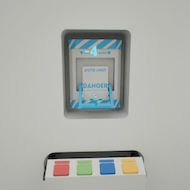
You press the button in Click To Continue 2 and the counter drops by one. That is the whole opening. No explanation, no tutorial panel, just a bright white room and a number ticking toward zero. Most players assume the game will explain itself if they click fast enough. It does not — but it does something far more interesting: it starts hiding rooms inside rooms, puzzles inside panels, and a small existential crisis inside what looks like a clicker.
| Genre | Decremental puzzle-clicker |
| Platform | Browser / PC |
| Core mechanic | Reduce a counter to zero by clicking and solving panel puzzles |
| Win condition | Unlock and solve the bunker door |
Most clicker games ask you to make a number go up. Click To Continue 2 asks you to drag a number down — specifically, from one million to zero, which is the combination locking the only door out of the white room. That inversion sounds like a gimmick, but it fundamentally changes the psychological weight of every click. A rising counter feels like reward; a falling counter feels like erosion, like you are scraping away at something with a teaspoon. That friction is the point.
The white room itself establishes tone before a single puzzle unlocks. Corporate-clean walls, an omnipresent camera, and a clinical absence of personality all work together to suggest that someone, somewhere, has designed this situation and is watching it proceed. Players who come from idle games expecting comfortable progression will feel the faint wrongness of the room almost immediately. The vibe has been compared to working in an Apple store that has no exits and no customers — the furniture-catalogue sterility is the joke and the dread simultaneously.
What unlocks that wrongness is the panel system. Dotted around the four walls are locked panels that open once you reach certain click thresholds. Early panels reveal pep talk signs that increase your clicks-counted-per-click — the game’s first mercy. Others unlock mini-games and skill challenges, each contributing different automation speeds or multipliers. Once you understand that the real game lives behind those panels and not in the raw clicking, Click To Continue 2 stops feeling like a clicker and starts feeling like an escape room wearing a clicker costume.
The auto clicker is one of the first meaningful unlocks, and it arrives early enough that players assume they can relax and let it run. That assumption is wrong. The auto unit’s efficiency is governed by a Simon Says-style memory game that repeats on a short timer. Win a round and the bonus counter climbs by one, flashing green. Fail and the counter resets, flashing red. Early rounds are easy enough that players rarely pay attention to the pattern; by the time the sequence length grows, many players have already stopped watching and wonder why their clicks-per-second feel sluggish.
The community term for this is babysitting the auto — the habit of keeping one eye on the memory game even while solving other panels, because letting the bonus lapse costs real time. Speedrunners in particular obsess over this, since a consistently high auto bonus can shave significant minutes from a run. The current community record sits around one hour and thirty minutes, with runners debating whether the drill or the laser provides better late-game output, the drill winning on peak throughput but the laser offering more consistent mid-run returns.
There is also the caffeine dust system, which divides players more than anything else in Click To Continue 2. The americano upgrade turns one click into two; the espresso turns one into three. These are static multipliers and they do not stack with each other, which catches players who buy both expecting compounding returns. The correct play is to treat them as alternative paths, not simultaneous investments. New players almost universally buy both before learning this, which wastes early resources at the exact moment the Rock Bottom Exchange starts offering minerals for clicks.
The Rock Bottom Exchange is where Click To Continue 2 starts requiring pen and paper from some players. The exchange lets you trade minerals — coal, metals, and items found in the tunnel — for click equivalents, but the conversion rates are not displayed cleanly, and the drill and furnace mechanics add physical interaction to what started as a pure clicking game. The first time a dropped piece of coal disappears into the unlit end of the tunnel, players understand why the light control panel is worth unlocking early. The darkness in the tunnel is an honest complaint in community discussions, where players regularly post that they lost coal to the shadow before discovering the lighting upgrade.
The terminal is the other major departure from standard clicker logic. Central to several wall panels, the terminal lets you manipulate game parameters by entering commands. The /identity command in particular appears in forums repeatedly — players reach it naturally through progression but discover it does nothing unless the correct preceding steps are complete, which is the kind of information the game deliberately withholds. Solving the terminal sequences properly requires cross-referencing environmental cues, codes found in other panels, and occasionally actual arithmetic. One widely cited Steam review describes getting a pen and paper out, not expecting that from a game that opened with a single button.
For players who engage with all of it — the auto bonus, the Rock Bottom Exchange minerals, the terminal commands — the puzzle layers interlock in a way that makes the white room feel genuinely designed rather than procedurally arbitrary. Each panel can be hacked or adjusted through the terminal, and the overarching puzzle of the room itself only becomes clear once enough panels are open. This is the moment Click To Continue 2 earns its reputation in the puzzle community as something more durable than its clicker surface suggests.
The most common beginner mistake is treating the auto clicker as a set-and-forget system. The second most common is ignoring the light control panel, which sits partway through the unlock sequence and transforms navigation around the room. Both mistakes compound each other: a player stumbling around a dark tunnel while their auto bonus drains loses on two fronts simultaneously.
Advanced players prioritize the panel unlock order differently depending on whether they are going for the two-hour completion achievement — Administrative Apex — or simply experiencing the game’s narrative conclusion. For the achievement, the DRA form answers need to be memorized or referenced from community guides, because the form appears once and the window to complete it quickly is short. Players going for the “without book” achievement face the inverse problem: they need to internalize panel codes without noting them down, which requires significantly more active attention during the first half of the run.
The honest divisive element is the auto clicker’s effectiveness. Community members have noted that even with external automation tools, the click rate is internally capped — approximately four clicks per second seems to be the ceiling in practice. Some players feel this cap makes the late tunnel sequences feel longer than they should, while others argue it is precisely the resistance that keeps the game honest. Click To Continue 2 is not an idle game in the traditional sense, and players who approach it expecting passive number growth will hit that cap and feel the friction acutely.
The auto unit’s output is linked to the Simon Says bonus counter, not hardware speed. If that counter has been allowed to drop to zero through missed or failed memory rounds, the unit runs at its base rate regardless of external click speed. Winning consecutive rounds and keeping the bonus counter high is the primary way to maintain strong auto output. Additionally, there appears to be an internal rate limiter of roughly four clicks per second even with automation active.
The americano and espresso are static multipliers converting one click to two or one click to three respectively. They do not stack — buying both does not give you a six-click return. Choose one based on your current economy, and do not hold both active simultaneously. The espresso is generally more valuable if you are still in a heavy manual-clicking phase before the drill becomes your primary source of output.
The /identity command requires completing specific prerequisite panel interactions before it registers. The game does not tell you this directly. The environmental cues in the room — visible when the light control panel has been unlocked — contain partial codes that correspond to terminal inputs. Cross-reference what you can read in the room with the hacking sequences on the main terminal, and work through them in the order panels physically unlock rather than attempting the terminal command early.
Click To Continue 2 is the kind of game that reveals its depth in inverse proportion to how confidently you approach it — the players who assume it is just a number-ticker miss the terminal sequences entirely, while players who treat every panel as a potential puzzle tend to find the corporate white room slowly becoming the most elaborate escape room they have played in a browser. The Rock Bottom Exchange, the Simon Says auto bonus, and the light-dependent tunnel make up a system that rewards attention long after the initial button has been pressed a thousand times.
