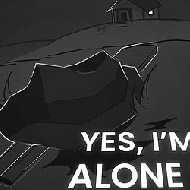
What Click To Continue Actually Is
The surface reads as a clicker game. One button, one room, one number counting down. But Click To Continue is better described as a puzzle game that uses clicker mechanics as both its wrapper and its punchline. The number on the bunker door starts at one million and every click subtracts one. At an unassisted rate that would take an absurd amount of time — and that is precisely the setup. The game is not asking you to click a million times. It is asking you to figure out why you should not have to.
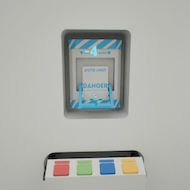
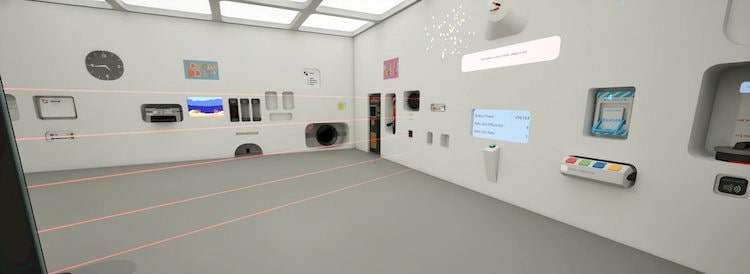
Spread across the four walls of the white room are panels, each with its own countdown. Once a panel opens it might reward you with a pep talk sign that silently increases your clicks-per-click multiplier, or it might reveal a puzzle, a skill challenge, or access to the central computer terminal. The more panels you open, the faster the door counter falls, and the more the room stops feeling like an endurance test and starts feeling like a test of attention.
The genre label “decremental game” — the door number going down rather than up — is the tidiest summary of Click To Continue’s attitude toward the conventions it inherits from the idle genre.
| Genre | Decremental puzzle clicker |
| Platform | PC (Steam) |
| Core mechanic | Click the button to open wall panels; solve puzzles inside them to accelerate the door countdown |
| Key elements | Bunker door, wall panels, pep talk signs, central terminal, DRA form, hacking minigame, coffee machine robot |
| Primary setting | A clinical white room with a locked bunker door |
| Completion time | 2–4 hours for a first run; a Steam achievement targets sub-2-hour completions |
The White Room and Its Panels
The white room’s clinical blankness is functional — every visual detail that exists there carries meaning, and the emptiness makes those details impossible to ignore. Players frequently describe the atmosphere as a corporate testing facility crossed with a wellness programme that does not actually care about your wellness. The pep talk signs that appear after certain panel unlocks express this perfectly: cheerful motivational slogans that mock productivity theatre while also genuinely boosting your click rate.
Wall panels are the primary unit of progression. Each has its own counter ticking down as you click, and once it hits zero it opens, revealing whatever is inside. Contents range from multiplier boosts to interactive challenges and terminal access. A few panels contain nothing useful at all — a deliberate choice that keeps the uncertainty real. Knowing the next panel might be a joke rather than a power-up is part of what stops the game feeling mechanical.
New players frequently hit a visibility problem: the room starts darker than screenshots suggest, and panel codes can be hard to read. The light control panel fixes this, but it does not always unlock early. If you find yourself squinting at labels in the first thirty minutes, keep clicking — the lighting adjustment is not far off and once active it persists for the rest of the run.
The Decremental Logic Behind the Door
Most clicker games frame progress as accumulation — numbers go up, resources compound. Click To Continue inverts this deliberately. The million on the door is a barrier to dismantle rather than a score to reach, so every upgrade feels like erosion rather than construction. You are not building toward something; you are escaping from something.
Players who expect traditional incremental pacing often misjudge where they are in the run. Pep talk signs increase your clicks-per-click value, the terminal can manipulate panel parameters, and the hacking minigame triggers bursts of accelerated progress — but none of these announce themselves as milestones. The door number just starts falling noticeably faster and you realise something has changed.
The community debates this opacity regularly. Some players love that there is no explicit progress bar outside the door counter, arguing it forces genuine attention. Others find the middle section frustrating when the door still shows an enormous number and the impact of current investments is unclear. The one thing most players agree the game withholds less cleverly than everything else is a cumulative click statistic — its absence comes up in Steam discussions more than any other single complaint.
Session Structure in Click To Continue
Click To Continue does not offer multiple named modes. There is one room, one door, one button. What it offers instead is a session arc rich enough that understanding its phases matters more than any mode list would.
The opening phase covers roughly the first quarter of a run. The door counter dominates the screen, the room is mostly empty, and most of what you do is click toward the first wave of panels. Very little happens quickly. Players who expect immediate feedback tend to bounce here; those comfortable with slow narrative setups tend to stay. The pacing is deliberate and the payoff requires patience.
The puzzle phase opens once enough panels are active to reveal the central terminal and its interconnected challenges. The DRA form appears here: a bureaucratic questionnaire with correct answers that, when submitted properly, unlock the Administrative Apex achievement. The hacking minigame activates through the terminal and lets you manipulate panel parameters directly, accelerating unlocks in ways raw clicking cannot replicate. Players who engage seriously with both systems see the door number falling at a noticeably different rate.
The coffee machine robot sequence recurs on a fixed interval and is partly environmental comedy, partly a source of the freezes some players report. The game also has more than one ending path, with the Book of Clicks factoring into the final sequence — completing the run without it is considered the harder variant by the small speedrunning community that has formed around the game. If you enjoy long-form progression systems like those in Clicker Heroes, the contrast in pacing philosophy between the two games is worth experiencing directly.
The Terminal, the DRA Form, and the Click To Continue Hacking Minigame
The central computer terminal is where Click To Continue stops being politely ambiguous about its puzzle ambitions. Through it you access the hacking minigame, trigger changes to active panel parameters, and interact with the DRA form — a bureaucratic questionnaire that parodies corporate HR with enough accuracy to land for anyone who has filled in an actual employee wellness survey.
The DRA form has specific correct answers the game does not provide directly. Working them out requires cross-referencing environmental clues in the room — several are embedded in pep talk sign text. Players who guess rather than observe can still complete the form but will not earn Administrative Apex and will spend significantly longer on it. A community-authored English guide to the answers exists in the Steam discussion board for players who want to run the form efficiently on a first attempt.
The hacking minigame received consistent feedback that it is underused. Players who engage with it tend to want more of it than the game provides — the most common specific criticism in reviews. When the minigame is active, use it immediately and direct the effect toward the panel closest to its own countdown zero. That combination produces faster unlocks than either system achieves independently. Players who appreciate timing-based decisions like those in Coin Clicker tend to find this the most replayable element of the terminal.
What Beginners Miss in Click To Continue
The most common early mistake is treating the game as a patience contest. Players who click continuously without engaging with the room are technically progressing but leaving large multipliers locked behind panels they could open faster by interacting with the content inside.
- Not reading the pep talk signs carefully. Several contain information relevant to the DRA form — in plain language, not hidden cryptically. Players who treat them as decoration skip embedded puzzle hints.
- Guessing on the DRA form. Working out the correct answers from environmental observation is the central puzzle the game is proudest of. Brute-forcing it costs fifteen or more minutes and misses the internal logic that makes the bureaucratic satire land.
- Ignoring hacking minigame timing. Each successful hack applies a parameter change to an active panel. Targeting one that is close to its own countdown zero delivers a faster unlock than random or delayed use.
- Missing the coffee machine robot sequence entirely. Players focused heavily on clicking during its window often do not register it, losing both the comedic payoff and context the sequence provides.
Strategy-minded players sometimes have the opposite problem: they over-research before starting and strip the game’s reveals of their impact. The community consensus is that a first run should be done relatively blind, with guides consulted after completion. The lighter loop of Fun Clicker works well as a warm-up if you want clicking stamina before engaging with Click To Continue’s slower-burn structure.
Playing Smarter, Not Just Faster in Click To Continue
Pro Tip: Before engaging seriously with the DRA form, walk the room and read every pep talk sign that has appeared. The answers to at least two form questions are in the sign text — in plain language, only visible if you are reading for information rather than atmosphere.
Pro Tip: The built-in autoclicker in Click To Continue underperforms significantly compared to manual input — community players describe it as notably poor. In the opening phase especially, manual clicking produces faster panel progress, which means the puzzle phase arrives sooner and the early pacing problem shrinks considerably.
Pro Tip: When the hacking minigame activates through the terminal, do not defer it. Hack immediately and direct the effect toward the panel closest to its own zero — that combination produces faster unlocks than either the minigame or raw clicking achieves independently.
Pro Tip: For the sub-2-hour Steam achievement, the DRA form is the single highest-leverage time save available. Most players who miss the target do so because the form cost them fifteen to twenty minutes through trial and error. Knowing the observation method required — not the specific answers, but the type of clue to look for — is more valuable than any click-rate optimisation.
Frequently Asked Questions About Click To Continue
How long does it take to finish Click To Continue?
A first playthrough without guides typically lands between two and four hours depending on how long the DRA form takes and how quickly you find the key multiplier panels. A Steam achievement targets completion in under two hours, functioning as a built-in speedrun challenge. The active community has pushed optimised runs below ninety minutes through efficient DRA form handling and precise hacking minigame timing. The game is designed as a single-session experience, so that total length is intentional.
Does Click To Continue have multiple endings?
Yes. The game has more than one ending path, and the Book of Clicks — an in-game item referenced in achievement names — affects which route you take through the final sequence. Completing the run without the Book of Clicks is the harder variant. The specific conditions for each ending connect to choices made during terminal interactions and DRA form submission, which is part of why the form is considered the game’s most significant puzzle rather than a side activity.
What is the DRA form and why do players get stuck on it?
The DRA form is a bureaucratic questionnaire accessed through the central terminal. It has specific correct answers derived from environmental clues in the white room — primarily the pep talk signs and certain panel interactions. The game does not indicate that the answers are findable this way, so players who treat it as an arbitrary form spend far longer on it than those who know to read the room first. Submitting correct answers earns Administrative Apex and is one of the most satisfying puzzle resolutions in Click To Continue.
The white room in Click To Continue holds more than it shows. The bunker door, the pep talk signs, the DRA form, the hacking minigame, the coffee machine robot — each is a layer revealed on the game’s own schedule. Players who match that pace, who take the puzzle design as seriously as the clicking, tend to describe their run as one of the more memorable short experiences the genre has produced. Whether you are here for the decremental loop or the deadpan corporate satire, Click To Continue asks for the kind of attention most games in this space never bother requesting.